

-
- No Comments
- September 2, 2026

How Do I Add NFL Ticket to Youtube TV
Introduction
If you are asking, “how do I add NFL ticket to YouTube TV,” the process is fairly simple. You can purchase it from your YouTube TV account settings, but there are a few choices you should understand before pressing the final button.
The package is officially called NFL Sunday Ticket. It gives football fans access to regular season Sunday afternoon games that are not being shown by their local CBS or FOX station.
In this guide, I will show you how to add NFL Sunday Ticket as an existing YouTube TV subscriber or while creating a new membership. We will also cover the process on computers, phones, tablets, smart televisions, and streaming devices.
Before purchasing, you should understand what the package includes, how billing works, and why certain games may still be unavailable. Spending a few minutes checking these details can prevent account problems and unexpected charges later.
Quick Answer: How Do I Add NFL Ticket to YouTube TV?
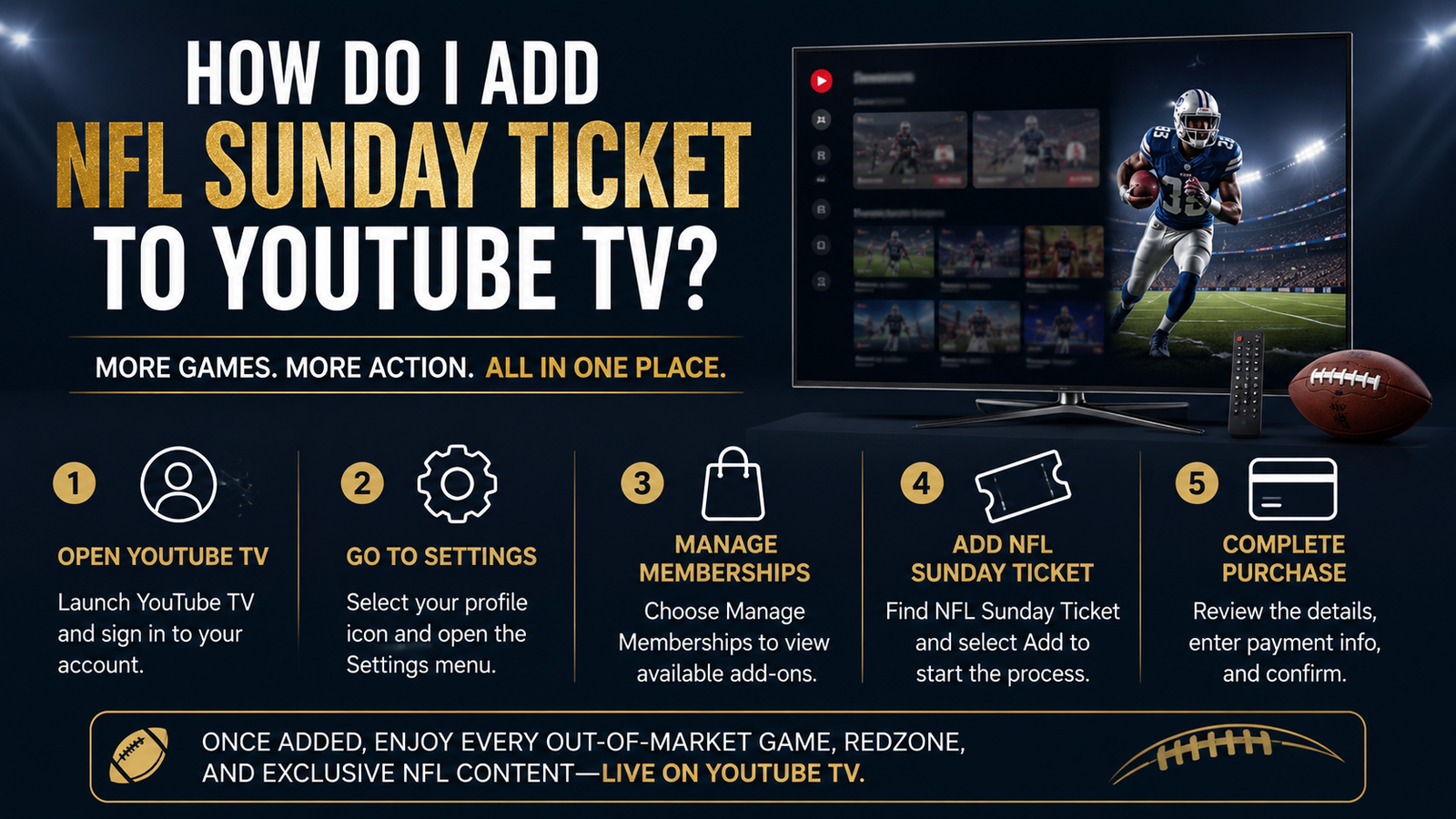
Visit YouTube TV and sign in with the Google Account connected to your paid membership. Select your profile picture, open Settings, find NFL Sunday Ticket in the membership options, select Add, choose your preferred package and payment plan, and then select Purchase to complete the transaction. (support.google.com)
What Is NFL Sunday Ticket on YouTube TV?

NFL Sunday Ticket is a premium football package designed mainly for out of market games. It lets you watch regular season games played on Sunday afternoons when those games are not available through your local CBS or FOX station.
The phrase “out of market” is important. It means the game is being broadcast in another television market but is not available through the local channels in your current viewing area.
Imagine that you support the Dallas Cowboys but live in Seattle. If the Cowboys play on Sunday afternoon and the game is not being shown by your local CBS or FOX station, NFL Sunday Ticket may allow you to watch it.
However, NFL Sunday Ticket does not automatically mean every NFL game will appear in one package. Sunday Ticket by itself does not include games already airing locally, national prime time broadcasts, or postseason games. (support.google.com)
National games can appear on networks and services carrying Sunday Night Football, Monday Night Football, or Thursday Night Football. Those games are controlled by their respective broadcasters rather than the Sunday Ticket package.
This is where a YouTube TV plan becomes useful. Its included local and national channels can provide many preseason games, local broadcasts, national games, and postseason matchups, while NFL Sunday Ticket fills much of the Sunday afternoon out of market gap. (support.google.com)
The combination gives you broader coverage, but you should still check the channel lineup for your location. Channel availability and the games you can watch may depend on your current playback area.
What You Need Before Adding NFL Sunday Ticket
If you want NFL Sunday Ticket as a YouTube TV add on, you need an active YouTube TV plan. The Sunday Ticket charge is separate from the regular cost of your YouTube TV membership.
You do not have to subscribe to YouTube TV just to purchase NFL Sunday Ticket. Viewers who only want the football package can buy it as a standalone YouTube Primetime Channel, although that option will not provide the broader local and national channel coverage available through YouTube TV. (support.google.com)
Before starting, prepare the Google Account that controls your YouTube TV membership. You will also need a valid payment method, a supported device, and permission for YouTube TV to verify your location.
Pay particular attention to the Google Account. Many people have multiple Gmail addresses connected to the same phone, browser, or smart television.
Open your YouTube TV account and check which email address appears under your profile before purchasing. The same account should be used when you later open the YouTube TV app to watch games.
Location access also matters because game availability is based on your current viewing area. If YouTube TV cannot verify your location, it may show the wrong local channels or prevent an eligible game from appearing. (support.google.com)
Finally, update the YouTube TV app on the devices you plan to use. An outdated app may not display the latest membership options or game features correctly.
How Do I Add NFL Ticket to YouTube TV as an Existing Subscriber?

If you already pay for YouTube TV, you do not need to create another television subscription. You can add NFL Sunday Ticket through the account that manages your existing membership.
The purchase is easiest to complete through a computer or mobile browser because you can clearly review the package, payment schedule, taxes, and renewal terms. Follow each step carefully and check the account information before confirming the charge.
Step 1: Sign In to the Correct YouTube TV Account
Go to tv.youtube.com and select Sign In. Enter the Google Account currently connected to your paid YouTube TV membership.
After signing in, select your profile picture and look at the account information. Confirm that the displayed email address matches the one receiving your YouTube TV receipts.
This small check can save you a frustrating afternoon. If you purchase Sunday Ticket through one account and open YouTube TV through another, the app may act as if you never bought the package.
If another person manages your household membership, make sure you understand which account is responsible for purchasing add ons. Do not create a second YouTube TV membership simply because NFL Sunday Ticket is missing from your personal profile.
Step 2: Open YouTube TV Settings
Select your profile picture in the upper corner of the YouTube TV screen. Choose Settings from the menu that appears.
The Settings area controls your membership, billing information, location, family sharing, and available add ons. Open the membership section to see the packages currently connected to your account.
The wording and screen arrangement may look slightly different depending on your device. You are looking for the area that displays your active YouTube TV plan and optional memberships.
Step 3: Find NFL Sunday Ticket
Scroll through the available packages until you see NFL Sunday Ticket. Select the option to view its current package choices and pricing.
Do not confuse NFL Sunday Ticket with NFL Network. NFL Network is a television channel, while NFL Sunday Ticket is the package that provides eligible out of market Sunday afternoon games.
Sports Plus is also a separate YouTube TV add on. It contains additional sports channels, but purchasing Sports Plus does not automatically give you NFL Sunday Ticket.
NFL RedZone is another related product. It moves between Sunday afternoon games to show scoring opportunities, important drives, touchdowns, and other major moments rather than presenting every game as a traditional full broadcast.
Step 4: Choose a Package and Payment Option
You may see NFL Sunday Ticket offered by itself or bundled with NFL RedZone. Consider how you normally watch football before choosing between them.
The standard package is better suited to someone who wants to select and follow complete out of market games. The RedZone bundle may appeal to viewers who want rapid coverage from multiple games, especially fantasy football fans.
You may also see a season pass, an installment schedule, or a month to month option. Availability can change according to the time of the season, your location, and the promotion currently attached to your account.
A season pass provides access for the NFL regular season covered by the package. Paying through installments divides the total season price into several payments, but it does not necessarily create a subscription that can be cancelled after any single month.
A genuine month to month plan works differently. YouTube says this option may become available closer to the start of the season and can be cancelled before a future monthly billing date. (support.google.com)
Read the description shown at checkout rather than judging the plan only by the size of the monthly payment. A lower monthly figure may represent one part of a full season commitment.
Step 5: Review the Price and Complete the Purchase
Before purchasing, review the complete price shown on the checkout screen. Look at the Sunday Ticket package, NFL RedZone selection, taxes, payment schedule, promotional discount, and renewal conditions.
Check the Google Account displayed on the page one more time. Also confirm that the payment method is current and has sufficient funds for either the full charge or the first scheduled payment.
Pay close attention to automatic renewal. A promotional price for the current season may not be the same price charged when the package renews for a future season.
When everything is correct, select Add and then Purchase. Wait for the payment confirmation before closing the page.
You should see confirmation on the screen after a successful transaction. Check your email for the receipt and keep it until you have confirmed that NFL Sunday Ticket appears inside your YouTube TV membership.
Return to Settings and open the membership section. NFL Sunday Ticket should now appear as an active package connected to your account.
You can then search for NFL inside YouTube TV or visit the NFL page. Live Sunday Ticket games normally appear when the season begins, while upcoming games may provide scheduling or notification options.
How to Add NFL Sunday Ticket When You Are New to YouTube TV

If you are new to YouTube TV, you can purchase your television plan and NFL Sunday Ticket during the same signup process. You do not need to create the YouTube TV membership first and then begin a completely separate transaction.
Step 1: Visit YouTube TV
Go to tv.youtube.com using a computer or mobile browser. Select Sign In and enter the Google Account you want to use for your YouTube TV membership.
Choose this account carefully. You will need to use the same Google Account when opening YouTube TV on your phone, smart television, or streaming device.
Step 2: Start Your Trial or Membership
Select Start Free Trial if an eligible trial is displayed. If you have already used a YouTube TV trial, select Sign Up instead.
A free trial is not guaranteed for every customer. Its availability can depend on your account history, location, and the promotion being offered when you register.
Step 3: Choose a YouTube TV Plan
Make sure YouTube TV is selected and continue to the available plan choices. Review the included channels for your home area before making a decision.
Your YouTube TV plan provides local and national television channels. NFL Sunday Ticket is then added separately to provide eligible out of market Sunday afternoon games.
Step 4: Add NFL Sunday Ticket
Find NFL Sunday Ticket among the package options. Choose whether you want the standard package or a bundle that includes NFL RedZone.
Read the description shown underneath each choice. The least expensive looking monthly figure may be an installment toward a full season commitment rather than a flexible monthly subscription.
Step 5: Enter Your Payment Information
Provide a valid payment method and check the billing address connected to your Google payments profile. Your billing location may affect available payment options and taxes.
Review the cost of YouTube TV and NFL Sunday Ticket separately. The checkout page should show what you are paying immediately and what will be charged later.
Step 6: Start the Membership
Select the final option to start your membership and wait for confirmation. YouTube’s official signup process establishes the television plan while adding the customer’s chosen NFL Sunday Ticket package. (support.google.com)
Check your email for a receipt. You can then open YouTube TV, search for NFL, and confirm that Sunday Ticket appears under your active memberships.
How to Add NFL Sunday Ticket on a Phone or Tablet
You can manage NFL Sunday Ticket from an Android phone, iPhone, or iPad. The first thing I recommend is opening the YouTube TV app and checking which Google Account is signed in.
Select your profile picture and open Settings. Look through the membership options for NFL Sunday Ticket and review the packages displayed on your device.
For the 2026 season, YouTube has advised customers to complete checkout through a web browser if the purchase option does not appear inside the Android or iOS app. Open Chrome, Safari, or another mobile browser and visit tv.youtube.com. (YouTube TV Community)
Sign in with the Google Account that owns your YouTube TV membership. Open Settings, find NFL Sunday Ticket, choose your package, review the payment terms, and complete the purchase.
Do not switch Google Accounts when moving between the app and browser. If you purchase the package using one account but watch through another, NFL Sunday Ticket may not appear.
After completing checkout, reopen the YouTube TV app. If the package is still missing, close the app completely, open it again, and confirm the account email shown under your profile.
Can You Add NFL Sunday Ticket From a Smart TV?
You can watch NFL Sunday Ticket on many supported smart televisions, game consoles, and streaming devices. Compatible options include various Roku devices, Fire TV products, Apple TV, Google TV, Chromecast, Xbox, PlayStation, and selected television models. (support.google.com)
Purchasing through a television screen may feel awkward, and the checkout option may not appear on every device. Using a computer or mobile browser gives you a clearer view of the package, payment schedule, taxes, and renewal terms.
Once the purchase is complete, open the YouTube TV app on your smart television or streaming device. Sign in with the Google Account used during checkout.
Search for NFL and open the NFL page. When games are available, you can also find them through the Home and Live sections of YouTube TV.
If the app continues asking you to purchase Sunday Ticket, check the profile email on the television. In many cases, the television is simply signed in to a different Google Account.
YouTube TV Add On Versus YouTube Primetime Channels

YouTube TV and YouTube Primetime Channels offer two different ways to purchase NFL Sunday Ticket. Both provide eligible out of market Sunday afternoon games, but the television coverage surrounding those games is different.
Understanding that distinction before paying is important. Otherwise, you might purchase the standalone package and expect it to include local or national broadcasts that require another service.
NFL Sunday Ticket With YouTube TV
This option combines NFL Sunday Ticket with an active YouTube TV plan. Sunday Ticket supplies eligible out of market Sunday afternoon games, while the television plan provides available local and national channels.
That broader plan may include CBS, FOX, NBC, ESPN, and other channels carrying preseason, local, national, and postseason games. The exact channel lineup depends on the viewer’s location and selected YouTube TV plan.
This is generally the more complete choice for someone who already uses YouTube TV. You can find local broadcasts, national games, Sunday Ticket matchups, recordings, and other television programming inside the same app.
Remember that these remain separate charges. Cancelling the underlying YouTube TV plan can also end access to an NFL Sunday Ticket package purchased as its add on. (YouTube & YouTube TV)
NFL Sunday Ticket Without YouTube TV
The standalone version is sold through YouTube Primetime Channels. It does not require a YouTube TV membership, cable plan, or satellite television subscription.
This option is useful if you only want eligible out of market Sunday afternoon games. You can purchase it through the NFL channel page on YouTube and watch it using a compatible device.
However, the standalone package does not independently provide local games, nationally broadcast games, preseason coverage, or postseason coverage. You will need the appropriate broadcaster or another television service for those games. (support.google.com)
The standalone version can also cost more than the YouTube TV add on for returning subscribers. Compare the entire cost, including the required YouTube TV plan, before deciding which option is genuinely better for you.
Should You Add NFL RedZone?
NFL RedZone and NFL Sunday Ticket create different viewing experiences. Sunday Ticket lets you select and watch complete eligible out of market games.
NFL RedZone moves rapidly between Sunday afternoon games. Its coverage focuses on scoring opportunities, touchdowns, important drives, and major moments from around the league.
The upgrade may suit fantasy football players who want to follow several players at once. It can also work well for viewers who enjoy continuous action and do not want to remain with a single game for three hours.
If you mainly support one team, standard NFL Sunday Ticket may already provide what you need. You can open your team’s eligible game and watch the full broadcast from beginning to end.
NFL RedZone is not automatically included with every NFL Sunday Ticket package. Look carefully at the package name during checkout and confirm whether RedZone is included before completing your purchase. (YouTube & YouTube TV)
How Much Does NFL Sunday Ticket Cost on YouTube TV?
Price checked September 2, 2026.
YouTube TV and NFL Sunday Ticket are billed as separate products. The standard YouTube TV plan is currently listed at $82.99 per month before the additional Sunday Ticket charge. (YouTube & YouTube TV)
For the 2026 season, YouTube’s official NFL Sunday Ticket page currently displays a price of $240 for new users purchasing it with YouTube TV. That can be paid at once or through eight noncancellable payments of $30.
Returning YouTube TV customers are currently shown a season price of $378. The displayed installment option divides that amount into eight noncancellable payments of $47.25. (YouTube & YouTube TV)
Some eligible paid YouTube Premium members who are new NFL Sunday Ticket subscribers may qualify for a separate $204 offer through October 31, 2026. That promotion has its own account, billing, and location requirements. (YouTube TV Help)
These prices can change, and not every account receives the same promotion. New customers, returning subscribers, students, and members of eligible professional communities may see different offers.
Treat the checkout screen as the final price for your account. Review taxes, RedZone charges, installment terms, and renewal conditions before purchasing.
Season Pass, Installments, or Month to Month
A season pass provides NFL Sunday Ticket access for the covered regular season. You can pay the complete price when purchasing or divide it into installments when that choice is available.
Installment payments do not make the season pass a flexible monthly subscription. They simply divide one full season commitment into smaller charges.
If you choose a season pass through installments, you remain responsible for every scheduled payment. Stopping your viewing or cancelling the underlying renewal does not erase the remaining balance for the season already purchased.
The number of installments can vary according to when you purchase and where your billing profile is located. Read the total price rather than focusing only on the amount displayed per month.
YouTube also offers a separate month to month plan closer to the beginning of the season. This version charges for one billing period at a time and can be cancelled before the next monthly charge.
If you cancel a month to month plan, access normally continues until the current billing period ends. The plan does not automatically renew after the football season.
Month to month availability may not appear immediately, and it is not offered in every United States territory. You also cannot automatically apply previous month to month payments toward a later season pass. (support.google.com)
Are Student Plans Available?
Eligible college and university students can purchase a discounted NFL Sunday Ticket Student Plan. The buyer must be at least 18 years old, enrolled at an accredited institution, and successfully verified through SheerID.
The Student Plan cannot be purchased as a normal YouTube TV add on. Students must visit youtube.com through a computer or mobile browser, open the NFL channel page, and choose the student option under the available Sunday Ticket packages.
After purchasing through YouTube Primetime Channels, the student can watch through either YouTube or YouTube TV. The same Google Account used during purchase should be used when opening either app. (YouTube TV Help)
Student access comes with stricter limits than the standard package. It does not include family sharing and supports only one signed in device with one stream playing at a time.
The Student Plan is also a one time purchase rather than an automatically renewing membership. Students must verify their eligibility again when purchasing a plan for a future season.
Pricing can change between seasons, so eligible students should check the verified amount shown during checkout. Student plans cannot be combined with additional coupons or promotional discounts.
How to Confirm NFL Sunday Ticket Was Added Successfully
Return to your YouTube TV profile and open Settings. Look inside the membership section and confirm that NFL Sunday Ticket appears as an active package.
Next, check the email address connected to your Google Account. YouTube should send a purchase receipt showing the package, payment method, amount charged, and account used for the transaction.
Open YouTube TV and search for NFL. Select the NFL page to view available games, upcoming broadcasts, recordings, and other football content connected to your subscriptions.
Live and upcoming games may also appear under Home and Live. If a game is scheduled for later, select it and choose Notify Me when that option is available. (support.google.com)
If YouTube TV still asks you to purchase NFL Sunday Ticket, compare the account shown in your profile with the email address on your receipt. Signing in with the wrong Google Account is often the real problem.
How to Watch NFL Sunday Ticket After Adding It
Open the YouTube TV app on your smart television, phone, tablet, game console, or streaming device. Computer users can visit tv.youtube.com through a supported browser.
Make sure you are using the Google Account that purchased NFL Sunday Ticket. Search for NFL, open the NFL page, and select the live game you want to watch.
If the game has not started, you may be able to set a notification or add it to your Library. You can also check the Home and Live sections on Sunday afternoon.
YouTube TV lets subscribers record eligible games through its cloud DVR. Add the NFL, your favorite team, or an individual game to your Library, and the available broadcasts covered by your subscriptions will be recorded.
NFL Sunday Ticket recordings cover eligible out of market Sunday afternoon games. Local and national game recordings depend on the channels included in your YouTube TV plan.
Condensed replays provide shorter versions of completed games when available. They are useful when you want the important action without watching an entire broadcast.
Multiview lets you watch selected combinations of up to four games on one screen. The available combinations are prepared by YouTube TV, so you may not always be able to create any exact group you want. (support.google.com)
Why Is My NFL Sunday Ticket Game Missing?

Buying NFL Sunday Ticket does not guarantee that every NFL game will appear inside the Sunday Ticket section. Location rules, broadcast rights, account problems, and membership status can all affect what you see.
Check the Current Playback Area
The games available through NFL Sunday Ticket depend on your current location. A game considered out of market at home may become a local game when you travel somewhere else.
On a smart television or streaming device, open your profile and select Location. Choose Current Playback Area and follow the instructions to verify where you are watching.
On a computer, select your profile picture, open Location, and choose Update beside Current Playback Area. Allow location access when your browser or device requests it. (support.google.com)
Check Whether the Game Is Local or National
NFL Sunday Ticket is built around regular season out of market games shown on Sunday afternoons. A game airing through your local CBS or FOX station may not appear as a Sunday Ticket broadcast.
National games are also handled separately. Check the appropriate broadcaster when searching for Sunday Night Football, Monday Night Football, Thursday Night Football, international games, playoffs, or the Super Bowl.
If you have a YouTube TV plan, search for the game itself rather than looking only inside the Sunday Ticket area. Your local or national channel may already carry it.
Check the Google Account
Open your YouTube TV profile and note the email address displayed. Compare it with the address shown on your NFL Sunday Ticket receipt.
Household members can easily open YouTube TV through their personal Google Account rather than the account connected to the purchase. Switch to the purchasing account and search for the game again.
If you use several profiles on the same smart television, check the active account on that device as well. Signing in correctly on your phone does not automatically change the account being used on your television.
Update the YouTube TV App
Install the latest version of the YouTube TV app. Close the app completely, restart your device, and open it again.
If the package still does not appear, sign out and sign back in with the purchasing account. You can also test YouTube TV through a browser to determine whether the problem is limited to one device.
Check the Membership Status
Open Settings and confirm that your YouTube TV plan and NFL Sunday Ticket are both active. Look for a failed payment, paused membership, expired trial, or cancelled television plan.
Remember that the add on version requires an active YouTube TV plan. If that underlying plan ends, access to the connected NFL Sunday Ticket package can also be affected.
Customers billed through an internet or mobile provider may see different features or package limitations. YouTube currently identifies Frontier, Verizon, and WOW! as providers that can offer their own NFL Sunday Ticket signup arrangements. (support.google.com)
Can You Cancel NFL Sunday Ticket or Get a Refund?
Cancelling automatic renewal is not the same as cancelling the current season. Turning off renewal prevents a future season charge, but it does not normally reverse the package you already purchased.
YouTube states that NFL Sunday Ticket season passes are generally nonrefundable. If you chose installments, you remain responsible for the remaining season payments even if you stop watching.
You can cancel automatic renewal before the next season. Your current access should continue for the season you purchased as long as the required YouTube TV plan remains active.
Month to month subscribers have more flexibility. You can cancel future monthly billing and continue watching until the end of your current billing period. (support.google.com)
Review the exact terms shown in your membership settings before making changes. Promotions and provider billed memberships may carry additional conditions.
Frequently Asked Questions
Can I Get NFL Sunday Ticket Without YouTube TV?
Yes. You can purchase NFL Sunday Ticket as a standalone YouTube Primetime Channel without subscribing to a YouTube TV plan.
The standalone package focuses on eligible out of market Sunday afternoon games. It does not independently provide the local and national channels included with YouTube TV. (support.google.com)
Do I Need Sports Plus for NFL Sunday Ticket?
No. NFL Sunday Ticket is a separate package and does not require the YouTube TV Sports Plus add on.
Sports Plus provides additional sports networks and may offer NFL RedZone separately. It should not be confused with Sunday Ticket access.
Does NFL Sunday Ticket Include NFL RedZone?
NFL RedZone is not automatically included with every NFL Sunday Ticket purchase. You can select a Sunday Ticket package containing RedZone when that bundle is available.
Read the package name carefully before paying. If it does not specifically mention NFL RedZone, assume you are purchasing only the standard Sunday Ticket package.
Can I Watch Every NFL Game?
NFL Sunday Ticket covers eligible regular season out of market Sunday afternoon games. It does not cover every local, national, international, postseason, or digital only game.
Combining Sunday Ticket with YouTube TV provides broader coverage through local and national channels. Some exclusive games may still require another streaming service. (tv.youtube.com)
Can I Record NFL Sunday Ticket Games?
Yes. You can add eligible NFL games, teams, or related programming to your YouTube TV Library.
Recordings depend on your active subscriptions. Sunday Ticket covers eligible out of market games, while your YouTube TV channels may cover local and national broadcasts.
Can I Share NFL Sunday Ticket With My Family?
A standard YouTube TV membership can be shared through a Google family group with up to five additional household members. Family members must use their own connected Google Accounts. (support.google.com)
The Student Plan is more restricted. It does not include family sharing and allows only one signed in device with one concurrent stream. (support.google.com)
Can I Purchase Games for Only One Team?
No. YouTube currently does not offer an NFL Sunday Ticket package for a single team or an individual game.
You must purchase one of the available Sunday Ticket packages to access eligible out of market games. (support.google.com)
Does NFL Sunday Ticket Include the Playoffs and Super Bowl?
NFL Sunday Ticket itself focuses on regular season out of market games played on Sunday afternoons. It does not independently include playoff games or the Super Bowl.
A YouTube TV plan may provide postseason games through included national channels. Check the channel carrying each game and confirm that it is available in your location.
Can I Watch While Traveling?
Yes, you can watch through supported devices while traveling within an eligible area. However, the games available to you may change according to your current playback location.
Update the Current Playback Area if YouTube TV shows the wrong channels or games. Location permissions may be required to verify where you are watching. (support.google.com)
Final Answer: How Do I Add NFL Ticket to YouTube TV?
If you are asking, “how do i add nfl ticket to youtube tv,” sign in with the Google Account connected to your membership, select your profile picture, open Settings, and find NFL Sunday Ticket. Choose the standard package or an NFL RedZone bundle, review the total price and payment terms, and select Purchase.
After paying, confirm the package under your memberships and search for NFL inside YouTube TV. Check your account, location, and package details carefully before buying because season passes generally cannot be refunded.
Read the Latest Eadoz Blog
Want to explore the business story behind another major technology company? Read Eadoz’s latest analysis, Anthropic 2028 Revenue Forecast Explained.


